
Leads & growth

AI inventory chat that sells while you sleep

Most shoppers browse after hours—when no one is on the lot to answer. AutoFire’s AI inventory chat reads your live stock, helps buyers find the right vehicle, answers common questions, and captures lead details 24/7 so you stop losing interest outside business hours.

LotIQ AI Assistant — friendly tire mascot giving a thumbs up

LotIQ AI

Your AI co-pilot for the lot

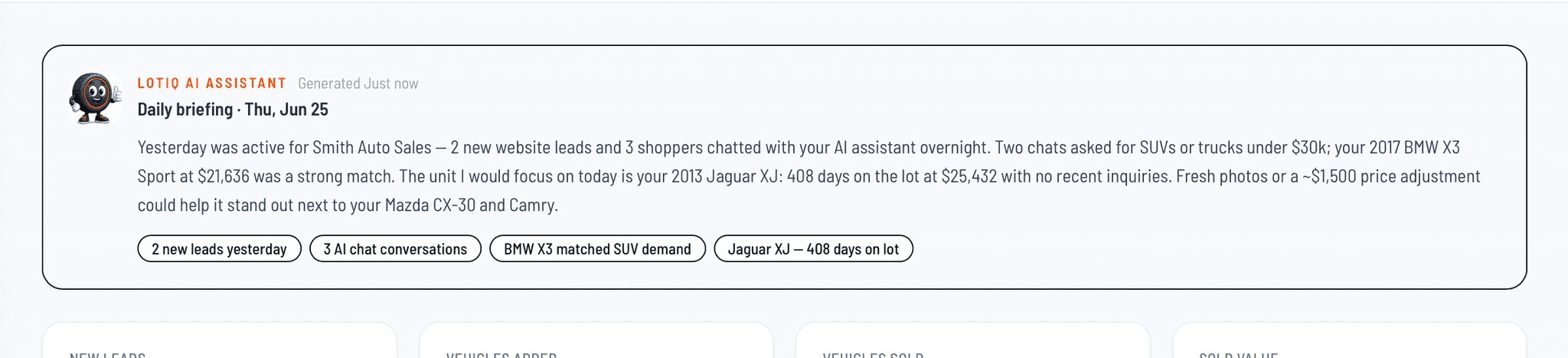
LotIQ turns live chat, leads, and inventory into daily briefings and demand insights—so you know what shoppers want and which units need attention before you buy your next car.

  • Daily briefing every morning: leads, chats, sales, and aging units
  • Demand trends from AI chat—body styles, price bands, and unmet stock
  • Calls out specific vehicles and actionable next steps—not generic stats
LotIQ AI Assistant daily briefing on the AutoFire dealer dashboard with inventory and lead insights

Highlights

  • Grounded in your live inventory

    Answers come from the vehicles actually on your lot—not generic web results.

  • Guides shoppers to a fit

    Helps buyers narrow by budget, body style, and needs toward vehicles you have in stock.

  • Captures leads after hours

    Collects contact details on nights and weekends so no inquiry slips through.

  • Answers common questions

    Handles repetitive questions about pricing, availability, and specs automatically.

  • Always on

    Works around the clock on your dealer site without adding staff hours.

  • AI Demand Trends

    Powered by LotIQ—see what shoppers search for most on your site and chat, so you know what to stock next.

Why it matters

Independent dealers can’t staff a chat desk 24/7—but buyers shop on their own schedule. AutoFire keeps the assistant tied to your real inventory so it points shoppers at cars you can actually sell and turns late-night browsing into captured leads. AI Demand Trends goes further: it aggregates what people ask for across chat and your site so you can make smarter buying decisions for the lot.

Practical notes

The assistant supports your team—your staff still closes the deal and confirms vehicle details.

Because answers draw from live stock, shoppers are guided toward vehicles you have, not ones you sold last week.

How it works in AutoFire

  • Your AI chat draws from the inventory you manage in Dashboard → Inventory—keep listings current and the assistant stays accurate.
  • Shoppers ask questions on your dealer site; the assistant guides them to matching vehicles and answers common questions.
  • When a buyer shows interest, the chat captures their details so leads land with your team to follow up.
  • Review Insights → Demand trends to see the body styles, price bands, and features shoppers ask for most—and where demand outpaces what you have in stock.

FAQ

Where does the AI get its answers?
From your live AutoFire inventory and dealership information—so it talks about the vehicles you actually have on the lot.
Does it replace my sales team?
No. It handles after-hours questions and lead capture so your team can focus on closing; people still sell the car.
What happens to leads it captures?
Contact details collected in chat flow into your lead workflow so you can follow up the next business day.
What is AI Demand Trends?
It is an Insights dashboard view that summarizes shopper demand from AI chat and site conversations—most-requested themes, unmet demand, and period-over-period shifts—so you can guide inventory buying.