
Your inventory and your website should be one thing
Most dealers either manage inventory in a spreadsheet and manually update their website, or pay for two separate systems that don't talk to each other. That means stale listings, missing photos, and cars on your site that were sold last week.
With AutoFire, your inventory IS your website. Add a vehicle in your dashboard and it's instantly published as a full, SEO-optimized page. Mark it sold and it disappears. One system, zero duplication, always accurate.
How inventory management works in AutoFire
Create your account
Sign up free in 30 seconds. Add your dealership name, address, and logo. Your branded website is instantly created.
Add your vehicles
Upload photos, enter pricing and specs, or use the VIN decoder to auto-fill details. Each vehicle gets its own optimized page.
Start getting leads
Your inventory is live and indexed by Google. Buyers find your vehicles in search results and contact you through built-in forms.
Inventory features built for dealers
Add vehicles in minutes
Upload photos, enter specs and pricing, and your vehicle is live. The VIN decoder auto-fills make, model, year, and trim to save you time.
Individual vehicle detail pages
Every vehicle gets its own page with a photo gallery, full specs, pricing, description, and a lead capture form. Each page has a unique URL for sharing and SEO.
SEO-optimized for every listing
Each vehicle page is server-rendered with its own title tag, meta description, and Vehicle schema markup. Google can index every car individually.
Lead forms on every vehicle
Buyers can inquire about a specific vehicle or schedule a test drive right from the listing page. You get notified instantly by email.
CARFAX integration
Display CARFAX reports on your vehicle pages to build trust with buyers. Just enter your CARFAX dealer ID and reports appear automatically.
AI-powered comparisons
FireCompare generates side-by-side comparison pages for your vehicles. Help shoppers compare similar models while creating additional SEO content.
Every vehicle page is built to rank on Google
Each vehicle detail page (VDP) is a standalone, server-rendered page with its own URL, title tag, and meta description. Google indexes every car individually.
Every VDP includes Vehicle schema markup — structured data that tells search engines the exact make, model, year, price, mileage, and condition. This can trigger rich results with pricing and photos right in Google search.
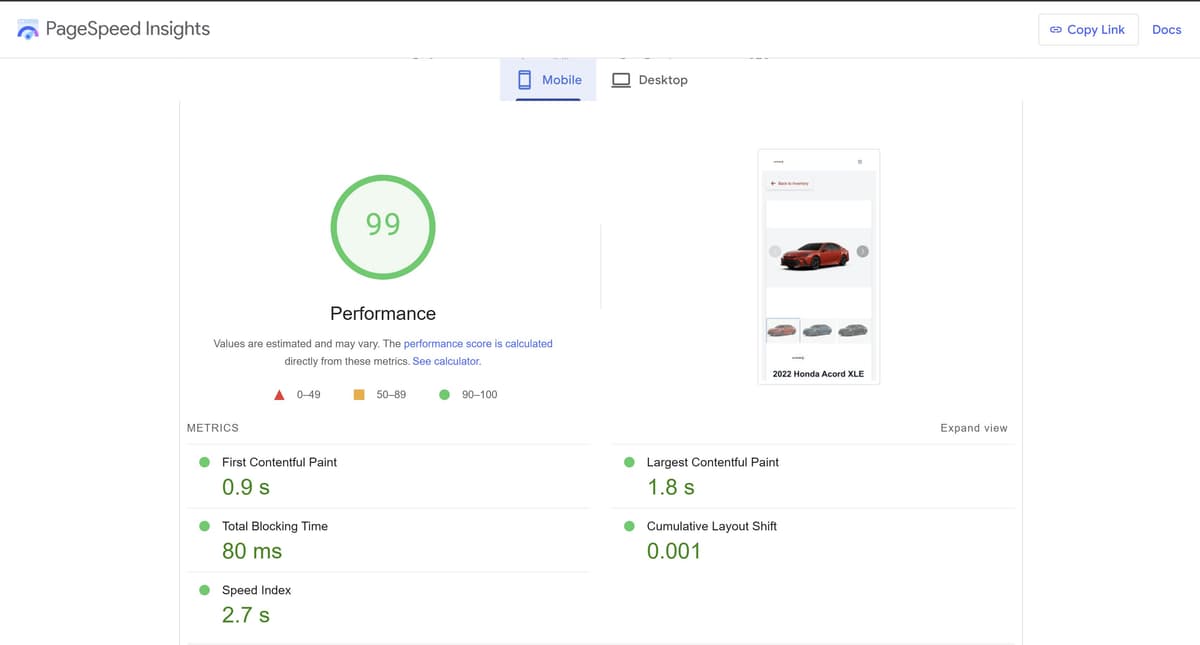
AutoFire sites score 90+ on Google PageSpeed, ensuring your vehicle pages load fast on mobile — where most car shoppers browse.
Inventory management included in every plan
$0/mo
Free Kickstart plan
- ✓Up to 10 vehicle listings
- ✓Photo uploads per vehicle
- ✓Individual VDPs with SEO
- ✓Custom subdomain
$99.99/mo
AutoFire Pro
- ✓Up to 50 vehicle listings
- ✓VIN decoder auto-fill
- ✓CARFAX integration
- ✓Lead capture on every VDP
Frequently asked questions
How do I add inventory to my dealership website?
In AutoFire, you add vehicles through your dashboard. Upload photos, enter the year, make, model, price, mileage, and description. Each vehicle automatically gets its own SEO-optimized page on your website. You can also use the VIN decoder to auto-fill vehicle details.
Can customers search and filter my inventory?
Yes. Your website includes an inventory page where buyers can browse all your vehicles. They can view individual vehicle detail pages (VDPs) with full photo galleries, specs, pricing, and a contact form to inquire or schedule a test drive.
Does AutoFire support vehicle detail pages (VDPs)?
Yes. Every vehicle you add gets a full VDP with photos, specs, pricing, description, and a lead form. Each VDP is a standalone page with its own URL, meta tags, and schema markup — so it can rank independently on Google.
Can I import inventory from a spreadsheet or DMS?
Currently, vehicles are added through the AutoFire dashboard individually. The VIN decoder speeds this up by auto-filling vehicle details from the VIN. DMS import and bulk upload features are on the roadmap.
How many vehicles can I list?
The free plan supports up to 10 vehicle listings. The Pro plan at $99.99/month supports up to 50 vehicles. Each listing includes photos, specs, pricing, and its own SEO-optimized page.
Does each vehicle page help with SEO?
Yes. Every vehicle page is server-rendered with its own URL, title tag, meta description, Open Graph tags, and Vehicle schema markup. This means Google can index each car individually, and your vehicles can appear in search results with rich snippets showing price and availability.
Explore more
Get your inventory online today
List up to 10 vehicles for free. Each one gets its own page, optimized for Google, ready to capture leads. No coding, no web developer, no contracts.