 ™
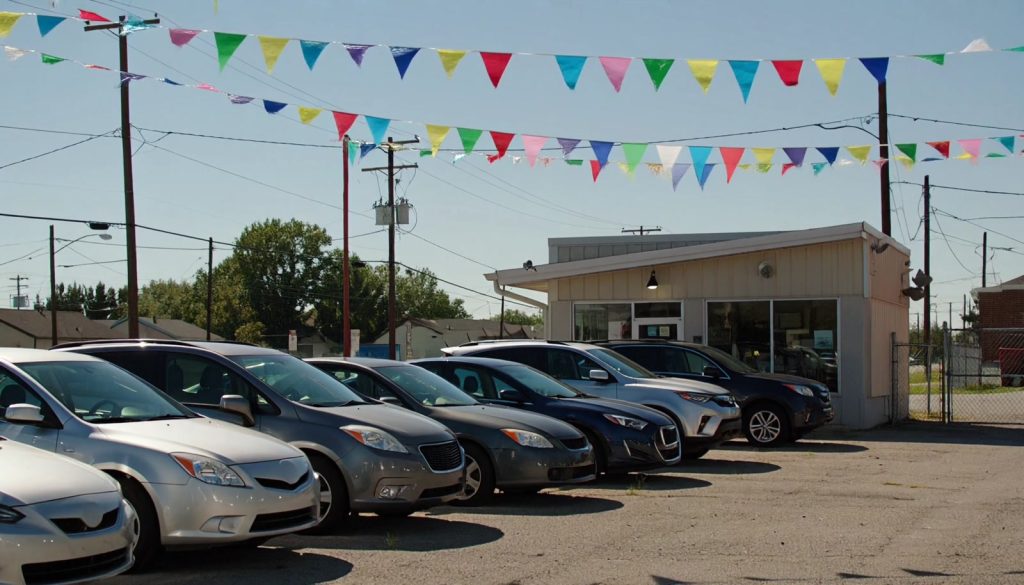

Cars.com Starter is the new self-service listing package Cars.com built for smaller independent dealers, and the company put real numbers on it for the first time on November 5, 2026. In its third-quarter results, Cars.com said nearly 400 independent dealers had already adopted the package (the earnings release calls it Marketplace Starter), that roughly 80% of the inventory those dealers list is priced under $20,000, and that more than 60% of eligible signups went live without any help from a sales rep.
If you run a used lot with a lot of $8,000 to $18,000 cars, this is aimed squarely at you. Cars.com does not count Starter dealers in its paying dealer total, and the signup page says there is no contract to negotiate. The main limit is leads. Starter includes up to 10 shopper leads a month. Before you sign up, it helps to know what that cap means for your store, what Cars.com's listing rules require of your prices and photos, and how a marketplace listing should sit next to your own website.
What Cars.com Starter includes
Here is what the Cars.com Starter signup page lists for the package:
- Your full inventory listed on Cars.com.
- A vehicle detail page for each car showing your dealership name, photos, price, mileage, and specs.
- Up to 10 shopper leads per month, with the shopper's contact information.
- The Cars.com Dealer app for iOS and Android, so you can manage listings from the lot.
The same page shows what Starter does not include compared with the paid Base package: dealership reviews, a dedicated account team, managed chat, autocorrected seller notes, and prequalification through Cars.com's network lenders.
Signing up takes three steps. You fill out a short form with your dealership details, Cars.com contacts you within one business day to verify the business and set up your dashboard, and then your inventory goes live. On the earnings call, CEO Tobi Hartmann said 60% to 65% of the new smaller dealers came on through the automated path instead of a manual onboarding process.

Why Cars.com wants lots with sub-$20,000 inventory
Hartmann was direct about the reason on the call. Affordability has pushed shoppers toward cheaper cars, and Cars.com did not have a strong offering in the segment "up to $20,000." Starter is how the company plans to fill that gap with listings from smaller local dealers. Cars.com's own surveys found that 50% of recent respondents were delaying a car purchase because of affordability, according to the prepared remarks.
CFO Sonia Jain added some context on where independents stand today. Cars.com's dealer base is roughly two-thirds franchise and one-third independent, which she put at about 20% to 25% penetration among independent dealers. Between paid subscriptions and Starter packages, Cars.com added close to 600 independent dealers year over year.
For you, that means Cars.com needs inventory like yours to show shoppers a wider range of affordable cars, and it is willing to list it without a monthly bill to get it. Hartmann also said Cars.com is working on "other solutions down the road" to bundle with Starter, and Jain described a "conversion feature" that has not been built yet. Expect upgrade offers once you are on the platform. Plan for that conversation now, so you go in with your own numbers instead of the rep's.
Is a 10-lead cap enough for your lot?
The cap is the part of Cars.com Starter that most affects whether it pays off. On the call, an analyst asked whether Cars.com would hold back leads to push dealers to upgrade. Hartmann said the package has "certain caps and certain limitations," that leads are one of them, and that caps could be extended or lowered over time. He also said Cars.com has been reworking its dealer lead engine so that new dealers do not wait three to four weeks for a first lead.
Run the math with your own close rate before you decide. Pull your CRM report for the last 90 days and find how many internet email leads it took to close one sale. Say your store closes one sale for every eight email leads. Ten Starter leads a month would then add about one retail sale a month if Cars.com shoppers behave like your other internet shoppers. A store that closes one in five would see about two. Use your real number; these two are only examples.
Then answer three questions during the verification call, because the public page does not cover them:
- What happens on lead 11? Ask whether shoppers can still see your phone number and address after you hit the cap, or whether the contact form changes.
- Do phone calls count against the 10? Many independent buyers call instead of filling out a form, and you want to know if those calls are tracked separately.
- Does the count reset on the calendar month or on your signup date? That tells you when a slow week at the start of the month actually costs you.
If you hit 10 leads by the middle of the month for two or three months running, you have evidence that Cars.com shoppers want your cars. That is the right time to price a paid package, with your close rate and gross per unit in hand.
Fix your prices before your cars go live on Cars.com

Cars.com's Vehicle Listing Policy, last revised June 23, 2026, applies to every dealer that lists on the marketplace, Starter included. Three rules catch independent lots most often.
The first is the Total Vehicle List Price. Cars.com requires a complete, all-in price in U.S. dollars that includes every non-governmental fee, broken down to show those fees. Taxes and government fees can be left out. Listings with no real price, such as $0.00, "Contact Dealer for Pricing," or "Call for Pricing," are prohibited. The listed price also cannot depend on financing incentives, down payments, or loyalty discounts.
The second is availability. You may only list vehicles that are physically on your lot and available to buy, and you have to remove sold, reserved, or pending vehicles as soon as their status changes. Cars.com can remove listings that break this rule.
The third is photos and video. Media has to show the actual vehicle you are selling, and you cannot use images to promote special offers, show a different price, or model payments. If your photographer adds a "$500 down" banner or a "Buy Here Pay Here" price graphic to the first photo, that image breaks the policy. Cars.com also bars commercial vehicles such as cargo vans, box trucks, and units with lift gates or utility beds. Pickups like an F-150 and passenger SUVs are fine.
These rules line up with what federal regulators want. Under the FTC staff's pricing transparency FAQs, the advertised price should be the price any shopper can pay, apart from government charges, and that applies to marketplace listings as much as to your own site. In its October case against Greenway Auto Group, the FTC said more than 92% of buyers at the group's Kia stores who bought vehicles advertised on CarGurus.com and Cars.com paid more than the advertised price. We covered what the Greenway order requires and how to audit your fees against the FTC's guidance in earlier posts, so start there if your doc fee or reconditioning fee is not already in your advertised price.
This is general information, not legal advice. State rules on dealer fees differ, so check with your state dealer association or attorney if you are unsure which charges count as government fees where you sell.
A setup checklist for Cars.com Starter
Most of the work happens before you submit the signup form. A small lot can get through this list in an afternoon.
- Export your current inventory from your DMS or website platform and sort it by price. Flag every unit with no price, a $0 placeholder, or a "call" price, and either price it or leave it off Cars.com.
- Remove commercial units from the export. Cargo vans and box trucks go elsewhere.
- Recalculate each advertised price as the all-in number: vehicle price plus every dealer fee you charge every buyer, such as doc, reconditioning, or prep fees. Keep the fee breakdown handy, because the policy asks for it.
- Check the first photo of every car. Remove price banners, payment graphics, and "special" overlays. A clean exterior shot in daylight works best.
- Write your own seller notes. Starter does not include Cars.com's autocorrected seller notes, so the description is on you. Mention recent service, number of keys, tire condition, and anything a buyer would ask on the phone.
- Pick one person to own Cars.com leads. With only 10 a month, every one should get a same-day reply from someone who knows the car.
- Add "Cars.com Starter" as a lead source in your CRM so you can count sales from it later.
- Decide who removes a car from Cars.com the day it sells, and put it on the same checklist you use to mark it sold on your website.
- Ask on the verification call whether Starter accepts an automated inventory feed or only manual entry and the Dealer app. If your website platform can export a Cars.com file, that answer decides how much typing you are signing up for.
If your site runs on AutoFire, the Cars.com inventory feed pulls the same VINs, all-in prices, and photos from your website into a CSV, and leaves unpriced cars out. Whether Cars.com connects that feed to a Starter account is Cars.com's call, so confirm it with them first.
How Cars.com Starter fits next to your own website
A Cars.com listing and your own vehicle page do different jobs. On Cars.com, your car sits in a results page next to similar cars from other dealers, and Cars.com controls the layout, the ranking, and the lead form. On your website, the shopper sees only your cars, your reviews, your financing form, and your phone number. Our explainer on how buyers use dealer websites and Cars.com goes deeper on that split.
Shoppers move between the two. Someone who sees your 2017 Corolla on Cars.com may search your dealership name before calling, land on your site, and compare the price. If the Cars.com price includes your doc fee and your website price does not, that shopper now sees two numbers for one car. A sponsored article on NIADA's Dashboard made the same point on November 2: pricing, availability, and promotions should match across your website, third-party marketplaces, and ads, because conflicting information makes shoppers hesitate right when they are deciding whether to contact you.
The 10-lead cap makes your own site more important. Once a shopper has seen your car on Cars.com, the next lead can come straight through your website with no cap. A site with a separate, crawlable page for every car, the same all-in price you list on Cars.com, and a clear call and text option gives those shoppers somewhere to go.
AI shopping tools add one more reason to keep the data consistent. Cars.com said its Carson AI shopping assistant passed 1 million monthly users, and it cited a Semrush analysis showing Cars.com was the most cited automotive marketplace across ChatGPT, Google AI Overviews, and Google AI Mode in September 2026. When an AI tool pulls your car's price from a Cars.com listing and then from your site, you want both to say the same thing. The same rule holds for every channel you add, including the eBay Motors dealer checkout that NIADA added as a member benefit in October.
What to track in the first 60 days
Starter costs you staff time even without a monthly bill, so give it a fair test and measure it. Track these numbers weekly in a simple spreadsheet:
- Leads received and the date you hit the cap, if you do.
- How fast each lead got a reply, and from whom.
- Appointments set and cars sold from Cars.com leads, using the lead source you added to your CRM.
- Phone calls and walk-ins where the buyer says they saw the car on Cars.com. Ask every buyer where they first saw the car and write it down.
- Time your team spends each week keeping Cars.com listings current.
- Any listing Cars.com flags or removes, and why.
After 60 days you will know whether Cars.com shoppers want your inventory, whether the cap is the limit or the leads are, and whether your team can keep two sets of listings in sync. If the answer to the last question is no, fix your inventory process before adding any marketplace.
Who should wait before joining
Starter is a good fit for most small independent lots with retail inventory under $20,000, since that is the inventory Cars.com said it wants. A few situations call for waiting:
If your DMS cannot produce an all-in price that matches what buyers pay, fix that first. Listing on another marketplace multiplies the number of places a wrong price can show up, and Cars.com's policy puts that responsibility on you.
If most of your lot is work trucks, cargo vans, or upfitted units, the commercial vehicle ban will keep much of your inventory off Cars.com.
If you sell mostly through buy-here, pay-here and advertise payments instead of prices, the policy's ban on conditional pricing and payment graphics means your current ad style will not carry over. You will need a cash price for every car before it goes up.
And if nobody on your team can answer internet leads the same day, those 10 leads may go to waste. Set up the lead routing first.
For everyone else, Cars.com Starter is a low-commitment way to test a large marketplace with your actual inventory this month. Clean up your prices and photos, decide who answers the leads, and track the results. If you also want your own dealership website with a page for every car, AutoFire can have your lot online the same day. Book a short demo and we will walk through it with your inventory.
Sources
- Cars.com Inc., "Cars.com Reports Third Quarter 2026 Results," November 5, 2026
- The Motley Fool, Cars.com (CARS) Q3 2026 earnings call transcript, November 5, 2026
- Cars Commerce, Cars.com Starter signup and package comparison page
- Cars Commerce, Cars.com Vehicle Listing Policy, last revised June 23, 2026
- Auto Remarketing, "Cars.com sets sights on independent dealers with new product launched during Q3 earnings call," November 6, 2026
- Dashboard by NIADA, "How AI Is Changing Car Shopping" (sponsored content), November 2, 2026
- FTC, Automobile Industry Pricing Transparency FAQs
- The Auto Wire, FTC Greenway case summary, November 9, 2026
