

Think of a used car dealer website template as a pre-built foundation for your online showroom. It’s a customizable framework that gives you all the essential tools—inventory listings, search filters, lead capture forms—without forcing you to build everything from scratch. This lets you get a professional, high-quality site up and running fast.
Why a Modern Website Isn't Optional Anymore
Your digital showroom has become your single most important asset. The days of depending on foot traffic and a Saturday ad in the local paper are over. The entire car-buying journey has moved online, and for an independent dealer, that's both a massive challenge and an even bigger opportunity.
A professional website is the cornerstone of selling cars today. It's your 24/7 salesperson and the very first impression a potential buyer gets of your dealership. We all know how much first impressions matter in this business.
Your Website Is Your Dealership's Reputation
An outdated website that’s slow or a pain to use doesn't just look unprofessional—it actively costs you business. The numbers don't lie: according to industry research, the vast majority of car shoppers now do their research online before they ever dream of stepping onto a lot.
Even more telling, a study by Stanford University found that a staggering 75% of people admit to judging a company's credibility based purely on its website design. A clunky, amateur site can kill trust before you ever get a chance to build it. You can discover more automotive marketing statistics and see just how critical that online presence has become.
This is exactly why choosing the right used car dealer website templates is a core business decision, not just an IT task. A modern template ensures your dealership:
- Builds Instant Credibility: A clean, professional look tells visitors you're a serious, trustworthy business.
- Meets Buyer Expectations: Today’s shoppers expect high-res photos, detailed vehicle specs, and intuitive navigation. Anything less is a deal-breaker.
- Captures Leads Proactively: Strategically placed forms and clear calls-to-action can turn a casual browser into a hot lead.
Leveling the Playing Field for Independent Dealers
Big franchise stores might have huge marketing budgets, but a top-notch website is the great equalizer. With a superior online experience, a smaller, independent lot can absolutely compete with the big guys.
By creating a seamless, intuitive, and trustworthy digital showroom, you can capture a buyer's interest and secure their business before they even think about visiting a larger competitor. Your website becomes your unfair advantage.
In the end, a modern website template isn't just a facelift for your brand. It's a fundamental tool for survival and growth. It transforms your online presence from a static brochure into a lead-generating machine that works for you around the clock, making sure you never miss a chance to connect with your next customer.
What a High-Converting Website Template Actually Needs
It's easy to get sidetracked by flashy designs when you're looking at used car dealer website templates. But I've learned from years in this business that what sells cars are the features that work behind the scenes, not just the pretty visuals. A great website isn't an online brochure; it's your hardest-working salesperson.
The heart and soul of your dealership's site is the inventory system. Put yourself in your customer's shoes for a minute. They're busy. They want to find the right car, right now, with zero hassle.
This means your template must have a powerful search function with plenty of filters—make, model, price, mileage, body style, you name it. Today's buyers also expect to see the full financial picture upfront, so built-in payment calculators and clear financing info aren't just perks anymore; they're standard.
To help you sort through the noise, I've put together a quick comparison of what you absolutely need versus what's nice to have. This should help you focus on the features that directly impact your bottom line.
Must-Have vs. Nice-to-Have Template Features
| Feature | Must-Have (For Core Business) | Nice-to-Have (For Enhanced Experience) |
|---|---|---|
| Inventory System | Advanced search with multiple filters (make, model, price, mileage). | Saved searches and vehicle comparison tools. |
| Vehicle Pages (VDPs) | High-res photo galleries, VIN-specific details, and clear pricing. | 360-degree interior/exterior views, integrated CARFAX reports. |
| Lead Capture | Simple contact forms on every VDP ("Request Info," "Schedule Test Drive"). | Live chat integration and "text us" buttons. |
| Mobile Design | Fully responsive, mobile-first design that passes Google's tests. | Dedicated mobile app or progressive web app (PWA) features. |
| Financing Tools | Built-in payment calculator on each vehicle page. | Full online credit application with secure submission. |
| SEO Foundation | Customizable title tags, meta descriptions, and clean URL structures. | Automated schema markup for vehicle listings. |
Focusing on the "Must-Have" column first ensures your website can do its primary job: generate qualified leads from your inventory. The "Nice-to-Have" features are fantastic for building a premium user experience once your core functionality is solid.
The Tools That Build Trust and Drive Leads
To really set your dealership apart, your template needs to do more than just list cars. It should anticipate and answer customer questions, building trust before they even pick up the phone. These are the features that turn a passive browser into an active lead.
Your template absolutely must include:
- Immersive Photo and Video Galleries: Don't skimp here. High-resolution photos from every angle are the bare minimum. The best templates also make it easy to upload video walkarounds for each car, giving buyers a much more transparent and engaging look at what you're selling.
- Integrated Finance Calculators: Placing a payment calculator directly on every Vehicle Detail Page (VDP) is a game-changer. It keeps potential buyers on your site, lets them see what they can afford, and effectively pre-qualifies them.
- Strategic Lead Capture Forms: Make it incredibly easy for someone to get in touch. A simple, clear form to "Request More Info" or "Schedule a Test Drive" should be prominently displayed on every single vehicle page.
A website's job isn't just to display cars; it's to start a conversation. Every feature should be designed to make it as easy as possible for a visitor to take the next step, whether that's calculating a payment or booking a visit.
If It’s Not Flawless on a Phone, It’s Broken
Let's be real: your customers are on their phones. They're scrolling through your inventory on their lunch break, waiting in line for coffee, or sitting on their couch. If your website is a pain to use on a small screen, you are losing sales. It's that simple.
A truly responsive design does more than just shrink your desktop site to fit a smaller screen. It intelligently re-arranges the content for an effortless mobile experience. Think big, easy-to-tap buttons, text that’s readable without pinching and zooming, and images that load fast without looking pixelated.
When you're choosing a template, make sure it was built with a mobile-first philosophy. This ensures you're meeting your customers exactly where they are. You can see how we've implemented this and other powerful tools by checking out AutoFire's key features.
Connecting Your Inventory for Seamless Automation
Let's be honest: manually updating your online inventory is a soul-crushing task. You sell a car, but forget to take it off the website. A potential buyer calls, gets excited, and then you have to break the bad news. It’s frustrating for them and looks unprofessional for you.
On the flip side, a fresh trade-in sits on the lot for days before you find the time to list it online, missing out on eager eyes. This is precisely the headache that modern used car dealer website templates are built to solve.
The entire goal is to eliminate double-entry. Your website shouldn't be another island of data you have to manage separately. A top-tier template will plug directly into your Dealer Management System (DMS), making it the single source of truth. When you mark a car as sold in your DMS, it should vanish from your site. Instantly. No extra clicks.
From VIN Scan to Live Listing in Seconds
Think about the sheer amount of time you spend punching in vehicle details. It's repetitive and prone to mistakes. This is where automatic VIN decoding becomes your best friend. Instead of manual data entry, you just scan the VIN.
The system does the heavy lifting, instantly populating the listing with critical details:
- Core Vehicle Specs: Year, make, model, trim, and engine information appear automatically.
- Factory Options: The decoder pulls in the specific packages and add-ons that car left the factory with.
- Standard Equipment: All the base features are listed, ensuring nothing is missed.
This isn't just a time-saver; it’s a trust-builder. An inaccurate listing can kill a potential sale before it even begins. Getting the details right from the start is non-negotiable. If you want to dig deeper into streamlining this, we have a great resource on mastering online inventory management with simplicity in our guide for independent dealerships.
Syndicate Your Inventory Effortlessly
Your own website is crucial, but you also need to be where the buyers are. That means places like CarGurus, Autotrader, and even Facebook Marketplace. But who has time to post and update listings on a half-dozen different platforms? It’s a full-time job in itself.
A powerful website template should function as your inventory command center. You manage your cars in one place, and the system automatically pushes them—and any updates—out to all the third-party marketplaces you use.
This "enter once, display everywhere" method is a game-changer for independent dealers. It guarantees consistency across every platform and puts your inventory in front of thousands more shoppers without adding a single minute to your workload. You get to focus on selling cars, not on endless data entry.
Driving Traffic with Smart SEO and Conversion Tactics
Let's be blunt: a beautiful website that nobody can find is just an expensive billboard in the desert. You can launch the slickest site on the planet, but if local buyers can't find it when they search, you've wasted your time and money. This is where you have to get serious about attracting the right kind of traffic and then, just as importantly, turning those visitors into real, actionable leads.
For any independent dealer, your world revolves around your Vehicle Detail Pages (VDPs). Think of them as your digital showroom. Each VDP is your one shot to grab a search engine's attention and make a powerful sales pitch to a potential buyer.
Getting Your Digital Showroom Ranked on Google
The single biggest mistake I see dealers make, over and over again, is copying and pasting the generic, manufacturer-provided descriptions for their vehicles. This is an absolute killer for your SEO. Google and other search engines are designed to reward unique, helpful content, not duplicate text they've already seen on a hundred other sites.
To get your VDPs to actually work for you, you need to do a few things right:
- Write Your Own Descriptions: Ditch the spec sheet and tell a story. Talk about the car's actual condition, point out a unique feature, and describe the ideal person for that vehicle. A single, well-written paragraph from your own experience is infinitely more valuable than a generic list of features.
- Put Schema Markup to Work: This is some simple code that works behind the scenes to tell Google exactly what's on your page. With the right vehicle schema, Google can pull your car's price, mileage, and VIN directly into the search results. This makes your listing pop and gives buyers the info they need at a glance.
- Dominate Local Search: Nobody is just searching for "used F-150." They're searching for "used F-150 near me." Getting your Google Business Profile in order is non-negotiable. Make sure your dealership name, address, and phone number are perfect, and start actively asking your happy customers for reviews.
A solid SEO foundation puts you right in front of local buyers the moment they're ready to shop. If you really want to dig in and get ahead of your competition, we cover a lot more ground in our complete guide on SEO for the automotive industry.
Turning Clicks into Customers
Getting people to your site is just step one. Once they land on a VDP, your job is to make it incredibly easy for them to take the next step. This is all about conversion rate optimization (CRO), and a few small changes can have a huge impact on your lead count.
Your website’s design should make the next step obvious and easy. Every button, image, and form should be strategically placed to remove friction and encourage a customer to connect with you.
Here are a few tactics that flat-out work for dealers:
- Make Your Calls-to-Action (CTAs) Impossible to Miss: Buttons like "Schedule Test Drive" or "Check Availability" need to be the most prominent thing on the page besides the car itself. Use a color that contrasts with your site's design so it really stands out.
- High-Quality Photos are Non-Negotiable: Grainy, poorly lit photos scream "untrustworthy." You don't need a professional studio, but a decent smartphone and some good light can make all the difference. Get at least 20-30 high-resolution pictures of every car, showing the interior, exterior, and any notable features or flaws.
- Offer Instant Communication: A buyer might just have one quick question. If they have to hunt for a contact form, they'll just leave. Tools like live chat or a "click-to-text" button give them an instant way to get an answer, keeping them on your site and away from your competitors.
When you pair a great website template with smart inventory management, the results speak for themselves. Car buyers spend a significant amount of time researching online before ever stepping on a lot. They expect to find detailed information and have easy ways to inquire right from your site. This is exactly why your template needs to be more than just a pretty face—it has to be a sales machine. You can discover more about how website templates drive leads at RCTHEME.com. By combining sharp SEO with user-focused conversion tactics, your website stops being a cost and starts becoming a powerful engine for growth.
Your Practical Launch and Maintenance Plan
Launching a new website can feel a bit like handing a customer the keys to their new car—you want to be absolutely sure everything is perfect before they drive off the lot. A solid plan takes the guesswork out of the process, turning a potentially chaotic launch into a smooth, controlled rollout.
Let's break this down into what you need to do before you go live and what you need to do to keep things running smoothly after.
The Pre-Launch Checklist
Think of this as your final inspection. You wouldn't let a car leave your dealership with a check-engine light on, and the same principle applies here. Nailing these details now saves you from major headaches and lost leads later.
- Inventory Data Migration: Go through your inventory on the new site with a fine-tooth comb. Has every single vehicle from your DMS or previous system been imported correctly? Look for missing photos, wonky pricing, or scrambled vehicle descriptions. A single typo can kill a deal.
- Lead Notification Configuration: This is critical. Send a test lead from every form on your site—the main contact form, the finance application, every "Schedule a Test Drive" button. Confirm that the notifications hit the right inboxes instantly. A lead that gets lost in cyberspace is a lost sale.
- Functionality Testing: Get hands-on and click everything. Does the finance calculator actually calculate? Do the inventory search filters work as expected? Can you sort by price, make, and model without errors? Now is the time to find and squash any bugs.
The whole point of this new website is to get customers from search engines to your showroom floor. The process is simple but powerful when everything works together.
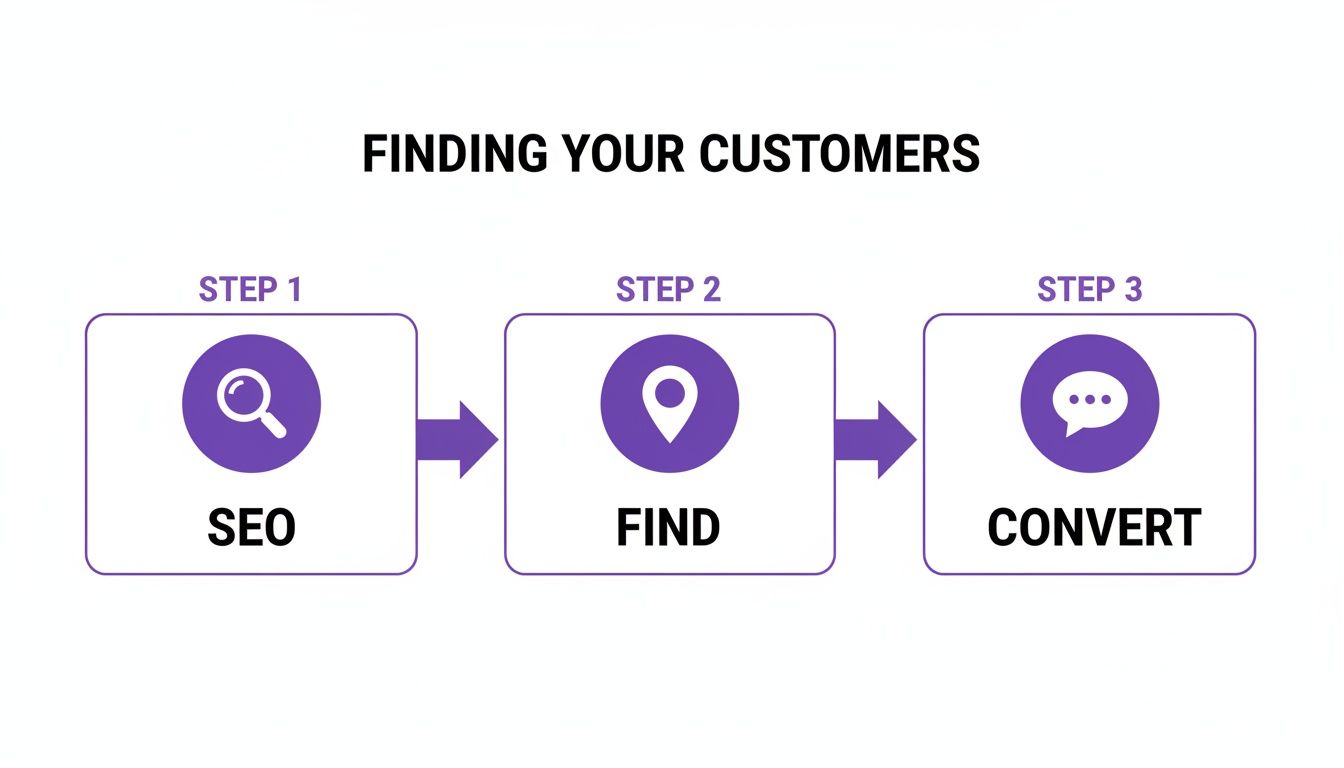
This flow—Find, Evaluate, Convert—is the engine of your online business. A flawless launch ensures it runs smoothly from day one.
Your Post-Launch Maintenance Routine
Getting the site live is just the beginning. A great website is never really "done." Consistent, ongoing maintenance is what separates the top performers from the sites that fizzle out after a few months.
Your website is a living asset, not a static brochure. Regular check-ins ensure it continues to perform at its peak, adapting to new browser updates, security needs, and customer behaviors.
You don't need to spend hours on this every day, but setting aside a little time each month to run through a quick health check is a smart move.
- Monitor Site Speed: Pop your URL into Google's PageSpeed Insights once a month. Pay close attention to the mobile score. A slow-loading site, especially on a phone, will send potential buyers running to your competitor.
- Check Analytics: Log into your Google Analytics account and see what's happening. Which cars are getting the most clicks? What pages are people leaving from? This data is pure gold—it tells you exactly what your customers are interested in and where your site might be falling short.
- Keep Content Fresh: You don't have to be a professional blogger, but adding new content helps. Post pictures of happy customers with their new cars, write a quick post about a new batch of inventory, or add a few new testimonials. Fresh content tells search engines your business is active and relevant, which is fantastic for your SEO.
Website Launch & Maintenance Workflow
To make it even easier, here’s a simple workflow you can follow. Think of it as a repeatable process for ensuring your most important digital asset is always working for you.
| Phase | Task | Key Objective |
|---|---|---|
| Pre-Launch | Finalize All Content & Images | Ensure every page has accurate, high-quality content before going live. |
| Pre-Launch | Test All Forms & Lead Notifications | Verify that every potential customer inquiry reaches your team instantly. |
| Pre-Launch | Check Mobile Responsiveness | Confirm the site looks and works perfectly on various phones and tablets. |
| Launch Day | "Go Live" – Point Domain to New Site | Make the new website publicly accessible on your official domain. |
| Post-Launch | Submit Sitemap to Google | Tell Google to crawl and index your new site for search results. |
| Post-Launch | Set Up Monthly Analytics Review | Establish a routine to track visitor behavior and find growth opportunities. |
| Post-Launch | Perform Quarterly Speed & Security Audit | Proactively check for performance issues and security vulnerabilities. |
Sticking to a simple routine like this demystifies website management. It ensures your initial investment continues to pay off by consistently generating leads and driving sales for your dealership.
Common Questions About Dealership Website Templates
Choosing a website template always brings up a few key questions. I've heard them all over the years. Getting straight answers is the only way to feel good about your decision, making sure you're putting your money and effort in the right place.
Let's walk through some of the biggest concerns I see independent dealers grapple with when they're ready to get a new site off the ground.
How Much Should I Expect to Pay for a Good Template?
This is the big one, and the answer is: it really depends. The price for a solid dealership template can swing wildly, so you have to look at the whole picture, not just the sticker price.
You’ve got basic themes on marketplaces that you can buy outright for $50 to $100. Seems like a steal, right? The catch is that you're on your own for everything else. You'll have to find and pay for hosting, security, and all the essential plugins. Those costs and the time spent managing it all add up fast.
The other route is an all-in-one platform. These services bundle everything you need—hosting, DMS integration, support, and updates—into a monthly subscription. You'll see these range anywhere from $100 to over $500 a month. When you're weighing your options, think in terms of "total cost of ownership." The time you save on technical headaches and the value of having everything work together seamlessly often makes a subscription the smarter financial move for a busy dealership.
Can I Switch Templates Without Losing My Inventory Data?
Absolutely. This is a common fear, but switching your website's look and feel without losing your vehicle data is usually pretty painless if you do it right. The secret lies in how your inventory is managed.
If you’re already using a Dealer Management System (DMS), the transition is a piece of cake. Your new website template simply needs to be connected to your DMS, and it will pull all your vehicle data right in. If you’re managing inventory through a plugin on your current site, most of those have tools to export your data, which you can then import into the new system.
Here's a piece of advice I give every dealer: always, always perform a full backup before you touch anything. And be smart about timing—plan the switch for your slowest time of day to make sure your customers see a smooth, professional changeover.
What Is the Most Important SEO Factor for a Car Dealer Site?
If you take away only one thing about SEO, let it be this: the quality of your Vehicle Detail Pages (VDPs) is everything. These pages are the heart and soul of your website. They are what your customers are searching for, and they are what Google cares about most when ranking your dealership.
To get it right, every single VDP needs:
- A unique page title. It must include the year, make, and model.
- A detailed, original description. Don't just copy and paste the manufacturer's specs. Write something helpful.
- A full gallery of high-res photos. Show every angle, inside and out.
- Complete and accurate vehicle specs. Don't leave anything out.
On top of that, you need to implement vehicle schema markup. Think of it as a special language that helps Google instantly understand all the details about your car. Getting this right is how you show up in those special search results, which can massively boost your visibility and bring more buyers to your site.
Ready to launch a professional website that turns visitors into leads, without the technical nightmare? AutoFire provides clean, SEO-optimized, and mobile-first website templates designed specifically for independent dealers. Get your free dealership website with AutoFire and start selling more cars today.